SPLIT Power: run your power workouts on a Garmin watch
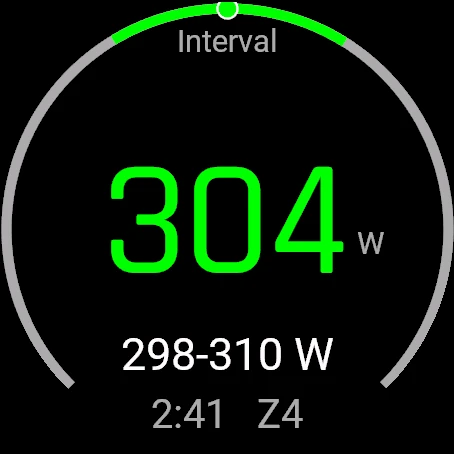
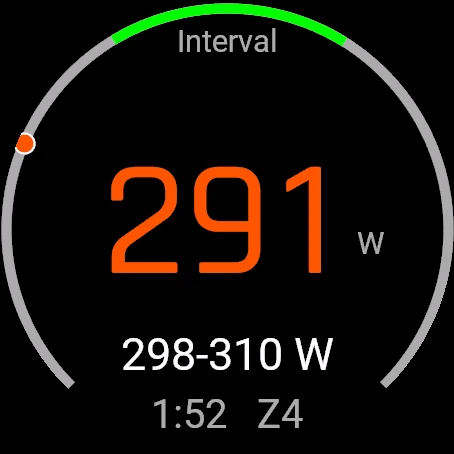
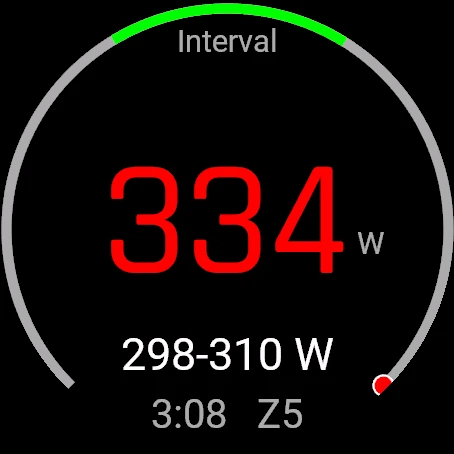
SPLIT Power is a free data field for Garmin watches. It shows what your structured workout asks for right now, in watts, next to the watts you are actually running. The number turns green inside the target, amber just outside and red well outside, and the watch beeps when you drift out. It reads your Stryd or other running power pod by itself, so you can follow a power session without turning on the watch's own running power.
What you need
- A supported Garmin watch (list at the bottom of this page).
- A running power pod, such as a Stryd. Without one, SPLIT Power uses the watch's own running power if your watch has it.
- A structured run with watt targets on the watch. Power sessions from a SPLIT plan arrive on your Garmin with watt targets built in. Any other Garmin workout with targets in watts works too.
Install and set it up
- Install. On your phone, open the Connect IQ app (or the Connect IQ Store), search for SPLIT Power and press Install. The watch picks it up at its next sync.
- Add it to your run. On the watch, open Run, then the activity settings, Data Screens. Add a new screen, choose the layout with one field, select that field and pick Connect IQ, SPLIT Power. One field gives you the full gauge; two or three fields per screen work too, with less on each.
- Wear the pod. Clip on your Stryd. SPLIT Power listens for it over ANT+ by itself; the watch's own running power can stay off. If you run near other people with pods, put your pod's ANT+ ID in the field's settings (see below), so it reads yours.
- Start the session. Open today's workout on the watch, start the run and scroll to the SPLIT Power screen. Before the first watts arrive it says Waiting for power; after a few seconds of running the number appears.
Change the settings in the Connect IQ app on your phone: My device, Installed apps (or Data fields), SPLIT Power, Settings. They reach the watch at the next sync.
Reading the field
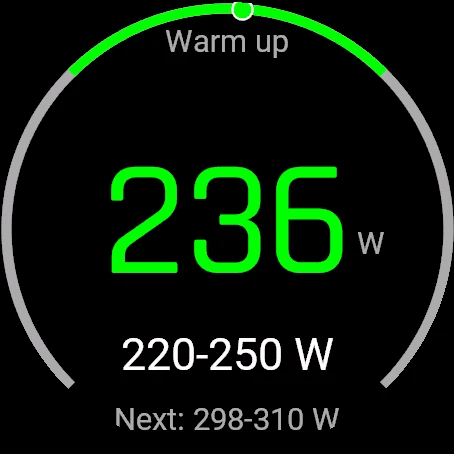
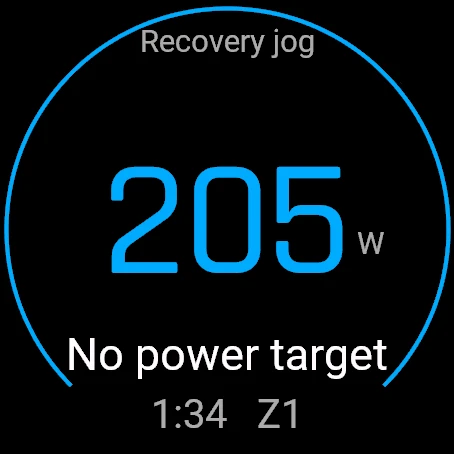
The ring is a gauge. The green arc is the target for the step, and the dot is where your power is right now. The step name sits at the top, the target under the number, and the time (or distance) left in the step at the bottom. The Z number in the corner is your power zone when you have set your Critical Power.
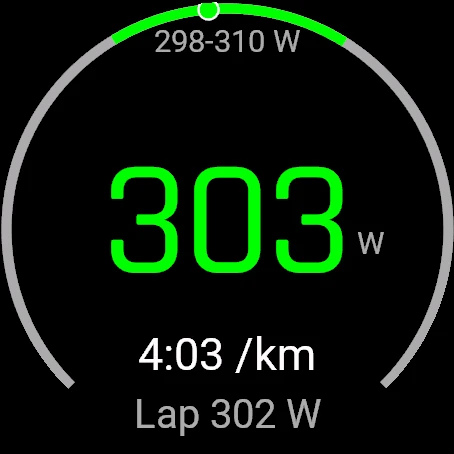
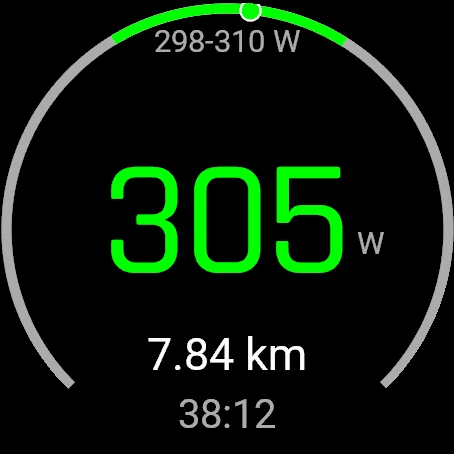
Watts and four values on one screen
Under Screen in the settings, pick one of three looks for a full-screen field. Gauge is the one above. The other two put your watts at the top, the step and its target right under them ("Interval 298-310 W"), and four values of your choice below. Out of the box those four are heart rate, distance, time left in the step and pace.
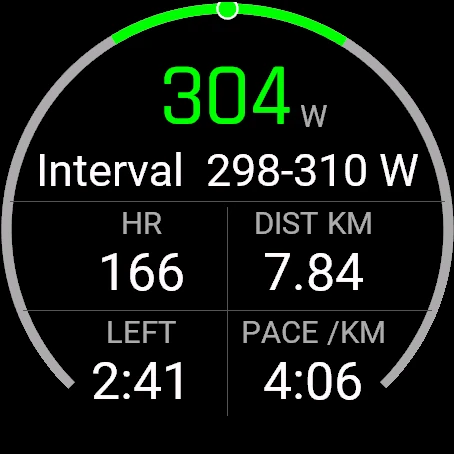
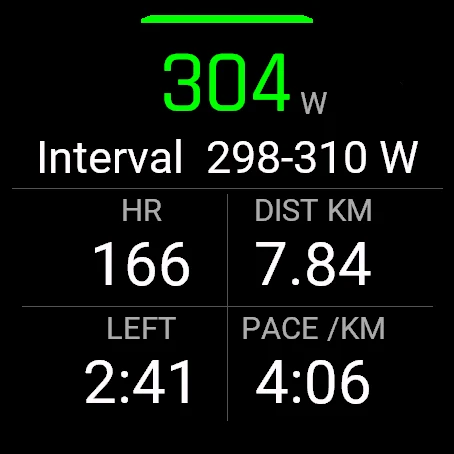
Each of the four values (Value 1 to 4) can be any of: Target, Time left in step, Time on this lap, Pace, Heart rate, Lap power, Cadence, Zone, Distance, Total time or Lap distance. The unit sits in the small label above the number. In the last 15 seconds of a step the line under the watts turns into the next step's target.
Beeps and buzzes
| You hear / feel | It means |
|---|---|
| One beep and one long buzz | Too slow: you have been under the target for 5 seconds. It repeats every 20 seconds while you stay under. |
| Two short beeps and two buzzes | Too fast: you have been over the target for 5 seconds. It repeats every 20 seconds while you stay over. |
| A tick each second, the last three higher | The step ends in 10 seconds and the next one starts. No band alerts during the countdown. |
| Nothing for the first 10 seconds of a step | Time to reach the new target before it warns you. |
These are the defaults. The alerts only sound while the timer runs. You can make them your own in the settings: tone and vibration, only vibration or only a tone; after 3, 5, 10 or 15 seconds outside; repeated every 10, 20, 30 or 60 seconds or only once; for too slow and too fast, or only one of them; and 0 to 30 quiet seconds after a new step. The countdown can run over the last 3, 5 or 10 seconds, as a tone, a buzz or both, and a short signal (three rising tones) can mark the start of every new step.
Settings
| Setting | What it does | Default |
|---|---|---|
| Screen | Gauge, Watts + 4 values with ring, or Watts + 4 values without ring. | Gauge |
| Value 1 to 4 | The four values under the watts on the two Watts + 4 values screens. | Heart rate, Distance, Time left, Pace |
| Line under the power | What the big line under the number shows on the Gauge screen. | Target |
| Bottom line, left | The left value on the bottom line. | Time left in step |
| Bottom line, right | The right value on the bottom line. When two values do not fit side by side, the left one is shown. | Zone |
| Small field, under the power | The line under the number when SPLIT Power sits in a small field (three or more per screen). | Nothing |
| Alerts outside the target | The beeps and buzzes when you are outside the band. | On |
| Alert sound | Tone and vibration, vibration only, or tone only. | Tone and vibration |
| Alert after outside the target | How long you may be outside before the first alert: 3, 5, 10 or 15 seconds. | 5 seconds |
| Repeat the alert every | 10, 20, 30 or 60 seconds while you stay outside, or only once. | 20 seconds |
| Alert when | Too slow or too fast, too slow only, or too fast only. | Too slow or too fast |
| Quiet after a new step | Seconds with no alert after a step starts, to reach the new target: none, 5, 10, 20 or 30. | 10 seconds |
| Countdown beeps before a step change | The ticks before the next step starts. | On |
| Countdown length | The last 3, 5 or 10 seconds of a step. | 10 seconds |
| Countdown sound | Tone and vibration, vibration only, or tone only. Also used for the new-step signal. | Tone only |
| Signal when a new step starts | Three rising tones (or a buzz) as each new step begins. | Off |
| Power smoothing | Average the watts over 3 or 10 seconds. 3 reacts faster; 10 is calmer on hills and in the wind. | 3 seconds |
| Critical Power (W) | Your Critical Power. It adds the zone (Z1 to Z5) and colours the number by zone on steps without a target. The target itself always comes from the workout. 0 = off. | 0 |
| Power pod ANT+ ID | Read only this pod. 0 = the nearest pod. The ID is in the Stryd app, or on the watch under Sensors. | 0 |
Each line can show: Target, Time left in step, Time on this lap, Pace, Heart rate, Lap power, Cadence, Zone, Distance, Total time, Lap distance or Nothing. Distance follows your watch's units (km or miles).
If something looks wrong
It says "Waiting for power", or "--" where the number should be
No watts have arrived yet. Start running: a pod sends power when it moves. Check that the pod is on your shoe and charged. If you set a Power pod ANT+ ID, check that it is the right one, or set it back to 0. If someone near you also runs with a pod before your run starts, the field may pick theirs up first; the ID setting fixes that.
It says "No workout"
The run has no structured workout. Start the session from the watch's workout list or calendar, not as a plain run. SPLIT Power still shows your watts, coloured by zone when you have set your Critical Power.
It says "No power target"
This step has no watt target, such as a jog recovery or a step with a pace or heart rate target. The next step with a watt target brings the band back.
The target is missing on a Garmin workout I built myself
SPLIT Power reads targets in watts. A target set as a percentage of FTP cannot be drawn without the watch's own FTP, so it shows as no target. Use watts in the workout.
The step name is cut short
A Garmin workout step name holds 15 characters. The target is always on its own line, so nothing is lost.
Supported watches
Fenix 6 Pro (6S Pro, 6X Pro), Fenix 7 (7S, 7X and the Pro models), Fenix 8 (43 mm, 47 mm, Pro, Solar), Enduro 3, Epix 2 and Epix Pro (42, 47, 51 mm), Forerunner 165, 245 Music, 255 (all four), 265 (and 265S), 570, 745, 945, 955, 965 and 970, Venu 2, 2 Plus, 2S, 3, 3S, 4 and X1, Vivoactive 5 and 6, and Marq 2 (and Aviator).
Privacy
SPLIT Power works on the watch only. It reads your workout and your sensors there, needs no account and no phone during the run, and sends nothing anywhere. Your runs reach SPLIT the usual way, through the watch's sync.
Get SPLIT Power →